
Looking for a Shorter Overview?
AI Summary
Key Moments
Visibility into actual SaaS and AI usage
Uniqkey Discovery tracks the real services employees access, including those outside IT oversight.Measuring authentication methods adoption
The product reveals how much login activity uses MFA, passkeys, and SSO to identify security gaps.Supporting compliance and audits
Discovery provides evidence to support regulatory compliance efforts like NIS2, DORA, ISO 27001, and more.Continuous discovery for ongoing risk management
Rather than one-time audits, Discovery continually updates the SaaS inventory and authentication posture.Most organisations know which applications IT has purchased. That is not necessarily the same as knowing which SaaS and AI services employees actually use.
A marketing team tries an AI service. A developer creates an account for a cloud tool. Finance starts using a specialist platform. Someone signs up for a free trial with a company email address, and a few months later that service has quietly become part of an important business process.
This is becoming normal. In 2025, 52.7% of EU enterprises used paid cloud computing services, up from 17.8% in 2014, according to Eurostat. AI adoption is growing too: Eurostat reports that 20% of EU enterprises with at least 10 employees used AI technologies in 2025, with Denmark at 42%.


For IT and security teams, this creates two connected questions: Which services are people actually using? How securely are they accessing them?
Uniqkey Discovery helps answer both. It provides ongoing visibility into the SaaS and AI services employees sign in to and shows how those services are accessed through SSO, MFA, passkeys or passwords. Teams can identify Shadow IT, investigate authentication gaps and track whether security improves over time.
Discovery is deployed centrally to company browsers through existing device management. Employees do not need to install or configure it individually. As they sign in during normal work, the organisation begins building a picture of its SaaS environment and access security.
Why SaaS and AI visibility has become harder
Employees can create cloud accounts in minutes, often without a purchase order or help from IT. A free tool can become part of a team’s daily work long before it appears on an official application list.
Finding out what is in use takes much longer. IT has to compare procurement records, finance subscriptions, identity provider connections and information held by individual departments. Even when a vendor appears in those records, the name alone may not reveal who created the account, which team depends on it or who is responsible for access when someone leaves. Establishing an owner can mean following up across several teams.
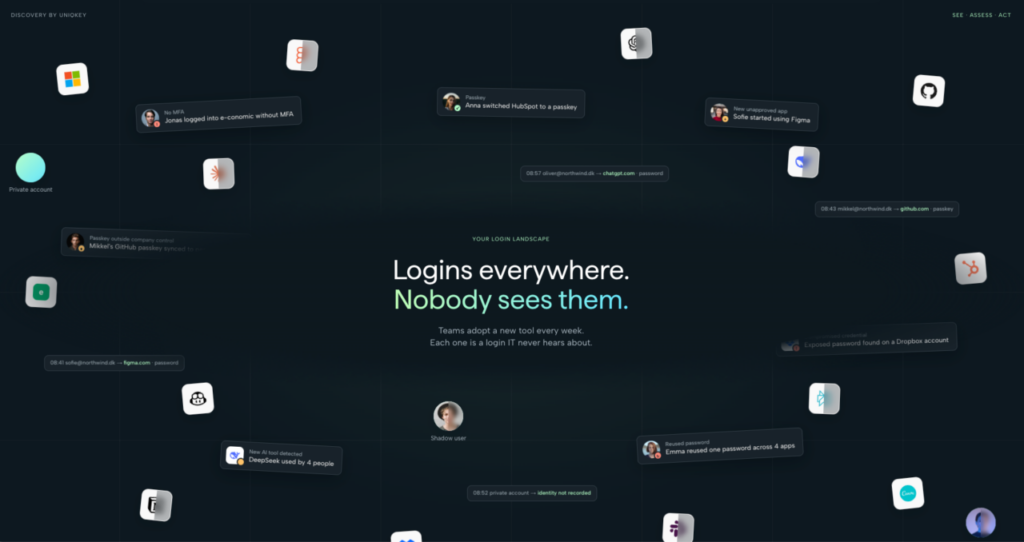
That work is time-consuming, and the resulting list can still be incomplete. Free plans may leave no purchasing or expense record. Services outside SSO will not appear among the identity provider’s connected applications. Some accounts have no documented owner at all.
IT then has another question to answer: how are people signing in to each service? Access may rely on SSO, MFA, passkeys or a standalone password. Piecing together records across systems and departments does not necessarily show the services employees actually use or how those logins are protected. Actual sign-in activity can help fill that gap.
What is Uniqkey Discovery?
Uniqkey Discovery is a standalone SaaS and access visibility product. It helps an organisation understand which services employees use, how they sign in, where security gaps exist and whether authentication initiatives are improving actual usage.
| Area | What it helps IT understand |
| SaaS inventory | Which SaaS and AI services employees sign in to, including services outside normal IT oversight |
| MFA adoption | How much observed login activity uses MFA and where important gaps remain |
| Passkey adoption | Where passkeys are used, if adoption is growing and risk of decentralised management. |
| SSO coverage | Which observed services and logins are protected by SSO and which are outside ITs control |
| Security overview | Authentication methods, password-strength signals, an organisation security score and areas to investigate |
These insights come from observed sign-in activity, rather than relying only on surveys or an application list that may already be outdated. Discovery therefore provides more than a one-time Shadow IT scan. It offers a way to understand how the SaaS estate and its authentication posture change.
Stop working in blind – and monitor services actually being used
Before IT can decide what to secure, consolidate or remove, it needs a reliable picture of the environment. Discovery identifies services employees sign in to. This can include CRM platforms, file-sharing tools, finance applications, developer services, HR systems, marketing software, industry portals, AI services and free trials.
For company identities on verified domains, IT can investigate usage and identify services that were not previously approved. New services continue to appear as employees adopt them.
An inventory completed today starts ageing tomorrow. Someone signs up for another tool. A team begins testing an AI service. A customer project introduces a new portal. Continuous discovery helps IT see these changes without repeatedly rebuilding a list from scratch.
Shadow IT and Shadow AI
Shadow IT means services used for work without normal IT approval or oversight. Usually, employees are solving an immediate problem rather than deliberately bypassing security. A designer finds a useful tool, a sales employee needs a PDF service, or a project team adopts a customer’s collaboration platform.
The risk grows when a service becomes important without an owner, an MFA policy, a security review or a place in the offboarding process. Discovery makes that gap between the managed environment and actual use visible.
AI has made the visibility challenge more urgent. Employees can adopt AI assistants, coding tools, transcription services, research platforms and image-generation products without a company-wide deployment. In a 2025 Bitkom survey of 604 German companies with at least 20 employees, 8% reported widespread employee use of private generative AI tools, 17% reported individual cases, and another 17% suspected use without being able to confirm it. Only 23% had rules for the use of generative AI.
AI services belong in the wider SaaS picture. The same discovery exercise may reveal unknown file-sharing, finance, developer and collaboration tools. IT can then investigate whether each service is approved, who uses it, how access is protected and whether it should be brought under organisational control.
Understand SaaS adoption as the environment changes
The value of a service inventory is not just its total number of entries. IT also needs to see which new services are becoming part of daily work and where usage is spreading.
This is particularly useful during rapid growth, a merger, a change in IT leadership or the start of an AI governance programme. Each situation begins with the same practical problem: understanding the environment that already exists before deciding what should change.
Discovery provides a baseline from observed sign-ins and keeps adding to that picture as employees use new services. IT can investigate previously unknown applications instead of waiting until a periodic audit, a procurement question or an offboarding problem brings them to light.
Measure how people actually sign in
Knowing that a service exists is only the first step. IT also needs to understand the authentication protecting it.
MFA adoption beyond the main identity platform
An organisation may have strong MFA coverage across Microsoft 365 or Google Workspace while employees still sign in to finance systems, supplier portals and smaller SaaS products outside those platforms.
Discovery measures MFA across observed login activity. It can show where MFA is used, identify high-activity services that still rely on passwords and track whether coverage improves. The useful question is not simply whether the organisation has an MFA policy. It is how much observed login activity is protected by MFA, and which important services are not?
Teams can prioritise those gaps, enable or enforce MFA where supported, assign an owner and measure the result. The need is concrete: ENISA’s 2025 Threat Landscape identifies phishing as the leading initial intrusion vector in its dataset, at about 60% of observed cases.
Passkey adoption and ownership
Passkeys provide phishing-resistant authentication and reduce dependence on traditional passwords. Making passkeys available, however, is different from knowing whether employees use them.
Discovery can show the share of observed logins using passkeys, where passwords remain the default, which services use passkeys and how adoption changes over time. This lets IT measure the transition towards stronger authentication.
There is also an ownership question. An important business account may have a passkey associated with an employee’s personal environment. The sign-in method may be strong, but access can become difficult to manage when that employee leaves. Discovery helps teams investigate important credentials and decide whether they need to be brought under company control.
SSO coverage and the applications outside it
An identity provider shows the applications connected to it. It does not necessarily reveal services that were never connected: niche SaaS products, free trials, partner portals and tools where SSO is available only on a higher-priced plan.
Discovery examines observed sign-ins to show which services and login activity are covered by SSO and which sit outside it. IT can investigate the long tail, decide which applications should move behind SSO and choose another access strategy where that is not practical.
The question becomes how much of the software employees actually use is covered by SSO?
That measure can change as more applications move behind the identity provider. It can also reveal that a high-priority service remains outside SSO because integration is unavailable or too expensive. In those cases, the right response may involve ownership, strong passwords, MFA and a defined offboarding process rather than an immediate SSO integration.
The full authentication mix
SSO, MFA, passkeys and passwords coexist. Discovery brings these methods into one view so IT can understand how a service is accessed. It can also provide password-strength information without collecting or handling passwords.
Two organisations might use the same number of SaaS services yet face very different risks. One may protect its important applications with SSO, MFA and passkeys; the other may depend heavily on standalone passwords. A service count alone cannot show that difference.
Turn visibility into a security baseline
Discovery brings the findings into an organisation-wide security overview, including a security score and measures such as password strength, passkey use and SSO use. The score is most useful as a starting point: IT can investigate what drives it, prioritise improvements and see whether the wider picture changes.
Security programmes often report what was deployed: MFA was rolled out, passkeys were introduced, or more applications were connected to SSO. Discovery helps answer the next question: Did people adopt those controls across the services they actually use?
That creates an ongoing process: discover the environment, establish a baseline, prioritise gaps, improve controls and measure the result.
For example, after an MFA initiative, IT can compare the share of observed logins protected by MFA over time. After a passkey rollout, it can see whether passkey use grows on supported services. After an SSO expansion, it can check whether a larger share of actual sign-ins is centrally managed. These measurements help distinguish implementation from adoption.
Discovery also highlights areas worth investigating. A heavily used service may have no MFA. A business-critical application may remain outside SSO. A new AI service may appear across several employees. Important access may depend on an unmanaged passkey. IT can review those findings and export documentation to support security reviews and audits.
More data alone does not make an organisation safer. Teams still need to decide which findings matter, assign owners and make changes in the services themselves. Discovery supports that work by turning observed activity into a more useful set of questions for IT and security teams.
Practical ways to use Discovery
| Goal | How Discovery helps |
| Build a live SaaS inventory | Identify services employees actually sign in to and see new ones as they appear |
| Find Shadow IT and Shadow AI | Investigate services outside normal approval and ownership processes |
| Measure MFA adoption | Find high-activity gaps and track coverage across observed logins |
| Move towards passkeys | See where passkeys are used and where passwords remain |
| Expand SSO | Identify important services outside the identity provider |
| Improve password security | Investigate weak, password-dependent access without collecting passwords |
| Improve offboarding | Discover services and account ownership before a departure creates an access problem |
| Prepare for an audit | Export evidence about services and authentication |
| Risk Assessment | Use real data to make your risk assessment |
| Show improvement | Track changes in MFA, passkey and SSO adoption over time |
Example: build an AI governance baseline
Consider a 300-person organisation beginning to formalise its AI policy. A survey asking employees which tools they use can help, but it produces a snapshot. Some people forget a service, and others start using a new one after the survey closes.
Discovery adds evidence from the services employees actually sign in to. When an AI service appears, IT can investigate whether it is approved, how access is protected, who uses it and whether it belongs in the managed SaaS estate. The same process can reveal previously unknown non-AI services.
The survey and the observed sign-ins can complement each other. A survey may explain why a team adopted a tool, while Discovery can show that it has become part of routine access. The organisation can then set an approved list and revisit it as new services appear.
Example: measure an MFA rollout
Imagine an organisation that has enforced MFA on its major systems and considers its project complete. Employees may still use dozens of smaller services outside the central identity platform.
Discovery can show where MFA is and is not observed across those logins. IT can prioritise high-activity services without MFA and monitor whether coverage improves. The team can then report the share of observed activity protected by MFA and identify the remaining important gaps, rather than reporting deployment alone.
Example: find the SSO blind spot
A company believes most applications are protected through Microsoft Entra ID. The major systems are connected, but a design platform, a supplier portal, a marketing service and a trial product all use separate accounts.
Those services may never appear in the identity provider’s connected application inventory. Discovery can expose them through sign-in activity, allowing IT to decide what should move behind SSO and what needs another access strategy.
Example: avoid an offboarding surprise
One employee creates the administrator account for a specialist cloud platform. Colleagues begin depending on it, but IT never adds the service to its inventory. When that employee leaves, access becomes a problem, especially if MFA or a passkey is tied to a personal account or device.
Finding the service while it is in use gives IT time to establish ownership and bring authentication under company control.
It also improves the offboarding checklist. Once an important application has an owner and a documented access route, a departure is less likely to reveal an unknown account at the worst possible moment.
Where different organisations can use it
The underlying visibility problem is common across industries, even though the services and risks vary. These examples are illustrative, not claims about specific Uniqkey customers.
Financial services. Core systems may be well controlled while employees still use specialist platforms, external finance portals and third-party SaaS. Discovery can show that wider ICT estate and how its services are accessed. For organisations subject to DORA, this evidence can support work on ICT assets, authentication and third-party risk within a broader compliance programme.
Manufacturing. Engineering, procurement, logistics and marketing may each use different cloud tools across locations. Discovery can help central IT identify those services and find authentication outside central controls. For organisations within scope, that visibility can support NIS2 work on asset management and access security.
Professional services. Teams may adopt research, transcription, analytics and collaboration services to serve clients. Discovery can reveal that SaaS environment and help answer detailed access-security questions during customer assessments.
Technology companies. Developers, sales, finance and HR often use different platforms. The major applications may already be behind SSO, while many smaller ones are not. Discovery helps identify that long tail and measure whether improvements extend beyond core systems.
MSPs and IT service providers. Providers may need to understand several customer environments. Consistent visibility into services, authentication gaps and audit evidence can make that work more repeatable across managed environments.
Supporting NIS2, Cyber Act, ISO 27001 and other regulations
Discovery does not make an organisation compliant on its own. Compliance also depends on policies, governance, processes, people and appropriate controls. Discovery contributes visibility and evidence.
For NIS2-related work, it can support service and asset visibility, access control, MFA, third-party oversight, assessment of security measures and management reporting. It can help a team maintain a view of services in use, investigate authentication gaps and show trends over time.
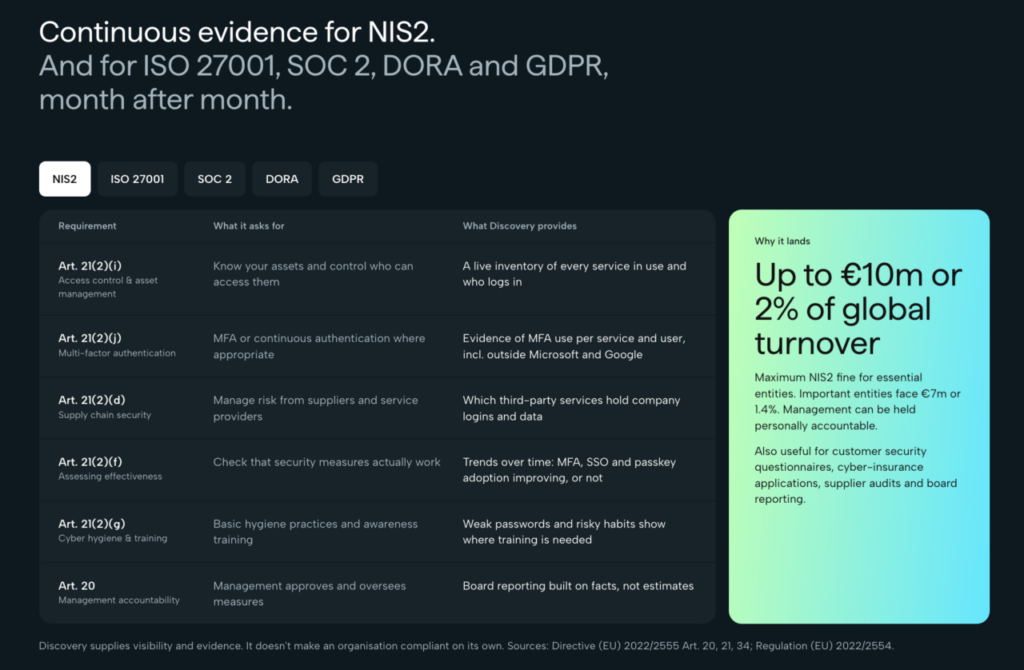
An audit question about MFA, for instance, becomes easier to answer when the team can show which observed services use it and where work remains. A question about cloud-service oversight can be supported by an inventory grounded in sign-in activity. This is evidence for the organisation’s processes; it does not replace a legal assessment or the controls themselves.
The regulatory pressure is significant. ENISA’s 2025 NIS Investments study, covering 1,080 organisations across EU Member States, found that 70% identified regulatory compliance requirements as the main driver of cybersecurity investment.
Discovery’s service and authentication evidence can also be useful in broader programmes involving ISO 27001, SOC 2, DORA and GDPR. The organisation remains responsible for deciding which controls and remediation its obligations require.
How deployment works
Uniqkey Discovery is rolled out centrally to company browsers through existing device management. Employees do not have to install it one by one, register the SaaS services they use or change how they work before the organisation starts gaining visibility.
After deployment, data begins appearing from normal sign-in activity. The initial picture can form quickly, while ongoing observation makes the inventory and authentication baseline more useful over time.
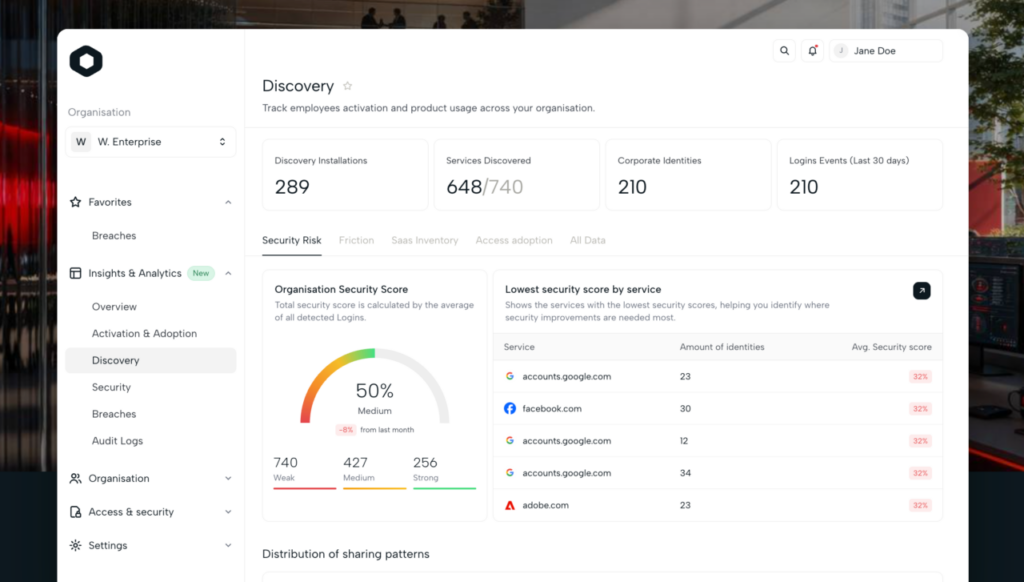
There is no requirement to replace an existing identity provider or migrate every application before starting. A team can first learn what employees already use, then decide which services require stronger authentication, an owner, an SSO integration or a security review.
Privacy and employee questions
Is Discovery employee monitoring?
No. Discovery focuses on sign-in events, not productivity or general browsing. For a relevant sign-in, it can record the service, login method, whether MFA or a passkey was used, password-strength information, whether the sign-in succeeded and when it happened.
Discovery does not collect passwords, page content, emails, messages, documents, keystrokes, screenshots or general browsing history. It is designed to answer which services the organisation signs in to and how those logins are protected.
What happens with private accounts?
Discovery distinguishes verified company domains from other domains. On domains outside the verified company set, it does not collect usernames or email addresses. Administrators do not see the person’s identity or individual login details. Those services can contribute only anonymously to an organisation-wide count.
For SSO sign-ins, the underlying identity may not be directly visible. Where a connection to another sign-in is possible, any inferred identity is shown only for a verified company domain and is marked as an inference rather than a confirmed match.
These distinctions matter when explaining Discovery to employees, data protection officers and works councils.
They also set a clear boundary for the use of findings. Discovery is intended to help the organisation understand services and the protection of sign-ins, while private-account identity and activity remain outside the administrator’s view.
Does Discovery see passwords?
No. Passwords are never collected in any form. Discovery can assess password strength without handling or storing the password itself.
Where is the data stored?
Discovery data is stored in the EU under European jurisdiction. Uniqkey is a Danish company, and its servers are hosted with European provider IONOS. The customer owns the data; Uniqkey processes it to deliver the service under a Data Processing Agreement.
Why continuous discovery matters
A SaaS inventory never stays finished. Teams adopt new applications and AI tools. Trials become permanent. Employees arrive and leave. More services move behind SSO, and MFA and passkey adoption change.
Discovery helps organisations see those changes instead of relying on a one-time audit. Its value is both finding services IT did not know about and measuring whether access security across the actual SaaS estate is improving.
See the environment you actually have
You cannot secure a service you do not know exists. You cannot govern an AI tool you cannot see. You cannot expand SSO intelligently without understanding what sits outside it. And you cannot improve authentication effectively without measuring how people sign in.
Uniqkey Discovery brings those questions into one view. It helps organisations discover SaaS and AI services, uncover Shadow IT, measure MFA, passkey and SSO adoption, identify access risks and track improvement over time.
You can’t protect what you can’t see.
See what your organisation is actually using. Discover SaaS and AI services, understand how your organisation accesses them and identify the security gaps that need attention with Uniqkey Discovery.