
Looking for a Shorter Overview?
AI Summary
Key Moments
Integrated Passkey and Password Management
Managing passkeys alongside passwords in one platform ensures seamless transition and operational continuity.Team Sharing and Offboarding Controls
Authorized sharing of passkeys and clear offboarding processes are essential for maintaining business security.Microsoft Entra Integration
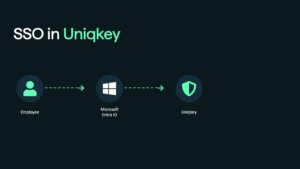
Support for Microsoft Entra's synced passkeys, SSO, and SCIM provisioning enhances identity management.European Ownership and Infrastructure
Having a European-based passkey manager supports procurement requirements and digital sovereignty.Passkeys remove one of the biggest weaknesses in business security: reusable passwords that can be guessed, stolen or phished.
But supporting passkeys is not the same as managing them across a business.
IT teams still need to decide where work passkeys are stored, who controls them, how employees use them across devices, when a passkey can be shared and what happens when someone leaves. They also need to manage the many applications that will continue to depend on passwords during the transition.

That is why Uniqkey manages passkeys and passwords together. Businesses can introduce passkeys for supported services without creating a separate credential system or losing control of the applications that still use passwords.
This guide explains what a business should expect from a passkey manager, how Uniqkey approaches the problem and how five alternatives compare.
Best business passkey managers compared
| Product | Best suited to | Passkey sharing | Business capabilities | Consider before choosing |
|---|---|---|---|---|
| Uniqkey | European organisations managing passwords, passkeys and access together | Yes | Entra synced passkeys, SSO, SCIM, enterprise deployment and work/private separation | Confirm any passkey-specific reporting required by your security process during a demo |
| Bitwarden | Technical teams prioritising open-source software or self-hosting | Yes, through organisation collections | SCIM, policies, event logs and self-hosting | Confirm which passkey-specific lifecycle events appear in logs |
| Keeper | Teams prioritising detailed controls around shared vault items | Yes | Admin console, reporting, policies and vault transfer | Verify passkey-specific reporting and service-side removal during offboarding |
| 1Password | Organisations already invested in its shared-vault ecosystem | Yes | Entra provisioning, policies, activity logs and enterprise onboarding | Confirm the passkey inventory and lifecycle detail available to admins |
| Dashlane | Businesses interested in its confidential-computing architecture | Not at the time of review | SSO, SCIM, policies and activity logs | Passkey sharing is listed as in development |
| NordPass | Existing NordPass customers needing standard passkey support | Yes | SSO, provisioning, activity logs and item transfer | No passkey import/export and less public detail on passkey administration |
All six products support passwords as well as passkeys. The more important differences appear in business ownership, sharing, deployment, lifecycle management, jurisdiction and the amount of passkey-specific information available to administrators.
The important offboarding distinction
Removing an employee from a credential vault should remove their access to items held in that vault. It may not delete a passkey already registered with the website or application accepting it.
A complete offboarding process can therefore require two actions:
- remove the employee’s access in the passkey manager; and
- remove or rotate the registered authentication method in the underlying service.
Test both steps before selecting any provider.
1. Uniqkey: best for European password, passkey and access management
Uniqkey is the strongest fit for businesses that do not want passkeys to become another isolated authentication tool.

It brings passkeys into the same business platform used to manage passwords and access. Employees can create and use passkeys for supported services, add more than one passkey to a login and share passkeys when approved team access is required.
The central advantage is not simply that Uniqkey supports passkeys. It is the combination of:
- passkeys and passwords in one platform;
- business-controlled work credentials;
- secure sharing for approved team access;
- Microsoft Entra synced passkeys, SSO and SCIM;
- employee onboarding and offboarding workflows;
- European ownership and infrastructure; and
- wider password and access-management controls.
This makes Uniqkey particularly relevant to European IT teams and MSPs managing a mixed environment. They can introduce phishing-resistant sign-ins for supported services without losing coverage for legacy applications or creating a second management layer.
Uniqkey’s help centre shows how to register and use passkeys and how to enable them for Microsoft Entra.
Choose Uniqkey when:
- your organisation wants passwords and passkeys managed together;
- work credentials should remain separate from employees’ personal vaults;
- teams or MSPs need controlled passkey sharing for permitted shared accounts;
- Microsoft Entra is central to identity and provisioning;
- European ownership and infrastructure matter in procurement; or
- the passkey rollout forms part of a wider access-management programme.
Confirm during your evaluation:
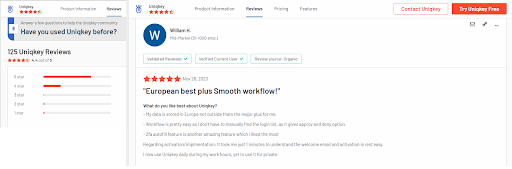
If your security process requires specific passkey inventory fields or individual audit events, ask Uniqkey to demonstrate those exact requirements using a real account and offboarding scenario.
Request a personalised Uniqkey demo
2. Bitwarden: an alternative for open-source and self-hosting requirements
Bitwarden is an open-source credential manager with cloud and self-hosted deployment options. Business users can store passkeys in login items and share organisation-owned items through collections. Administrators can use policies, directory integration, SCIM and event logs.
Bitwarden also documents using a passkey stored in its mobile vault to sign in to a supported Entra-joined Windows device. This requires specific Microsoft configuration and should be tested against the organisation’s device environment.
Bitwarden may be a better fit when self-hosting or open-source deployment is a firm requirement. At the time of review, its published business pricing lists Teams at $4 and Enterprise at $6 per user per month, billed annually in USD.
Before choosing it, confirm which passkey creation, sharing, removal and usage events are individually available to administrators.
3. Keeper: an alternative for controlled vault sharing
Keeper supports creating, storing, syncing and autofilling passkeys. It says passkeys can be shared with other Keeper users using permissions, expiry and revocation controls.
Its enterprise platform also offers an admin console, reporting, policies, SSO and vault transfer. It is a credible option for organisations that already use Keeper or place particular weight on its shared-item controls.
Ask Keeper to demonstrate how passkeys appear in administrative reporting and how both vault access and the registered passkey are handled during offboarding.
4. 1Password: an alternative for mature shared vaults
1Password supports storing and using passkeys across supported devices and browsers. Passkeys can be shared through team vaults or item sharing, while its business offering includes policies, activity logs and Entra ID provisioning.
It is most relevant to organisations already standardised on 1Password or those that prioritise its established vault model and enterprise onboarding programme. The company advertises customised deployment support for organisations with 100 or more users.
Before selecting it, confirm whether the administrative view provides the passkey inventory and lifecycle events your organisation requires.
5. Dashlane: an alternative for confidential computing
Dashlane uses a confidential-computing model for synced passkeys. The company says cryptographic operations occur inside AWS Nitro Enclaves, which are designed to isolate sensitive processing from the surrounding cloud environment.
Its business platform also includes SSO, SCIM, policies and activity logs. Dashlane may be worth evaluating when its secure-enclave architecture is a priority and passkey sharing is not needed.
At the time of review, Dashlane states that users cannot share passkeys, although the capability is in development.
6. NordPass: an alternative for existing NordPass customers
NordPass supports creating, storing and using passkeys through its applications and browser extension. It also supports passkey sharing. Its business product includes SSO, provisioning, activity logs and transfer of company-owned items when an employee leaves.
It is primarily a practical shortlist option for businesses already using NordPass. Its public passkey material focuses more on the employee experience than the administrator’s view of the passkey lifecycle.
According to the NordPass passkey FAQ, passkeys cannot currently be imported or exported, and the username or website associated with a saved passkey cannot be edited.
How to choose the right passkey manager
A feature table is useful, but it cannot show how a product behaves in your environment. Use a trial or technical demonstration to test the following:
- Company ownership: Is a work passkey held in a company-managed vault rather than a personal credential store?
- Mixed credential support: Can employees manage passwords and passkeys without switching platforms?
- Microsoft compatibility: How do synced passkeys, SSO and provisioning work with Microsoft Entra?
- Team access: Can a permitted shared account use a passkey, and how is that access revoked?
- Offboarding: What happens in the vault, and what must still be removed from the underlying service?
- Administration: Can IT identify the passkeys and events required for security reviews?
- Recovery: What happens if a device is lost or replaced?
- Platform coverage: Do the required browsers, desktop systems and managed mobile devices work?
- Jurisdiction and infrastructure: Do the provider’s ownership, hosting and contractual model fit procurement requirements?
- Deployment: Can the platform integrate with existing identity and employee lifecycle processes?
Native credential managers can suit individuals and small teams. Apple, for example, supports sharing passwords and passkeys with a group. A dedicated business platform becomes more valuable when the organisation needs cross-platform access, company ownership, central deployment, provisioning and controlled offboarding.
What is a passkey manager for business?
A business passkey manager lets employees create, store and use passkeys for work accounts while giving the organisation controls that consumer credential managers may not provide.
Depending on the platform, those controls can include:
- company-managed vaults;
- separation of work and personal credentials;
- passkey sharing for approved team accounts;
- user and group provisioning;
- policies and activity records;
- controlled onboarding and offboarding; and
- support for passwords, 2FA codes and other credentials alongside passkeys.
This is different from a developer passkey platform. Developer platforms help companies add passkey authentication to their own applications. The products in this comparison help employees manage passkeys for the business applications they use.
Synced and device-bound passkeys
Not every passkey works in the same way.
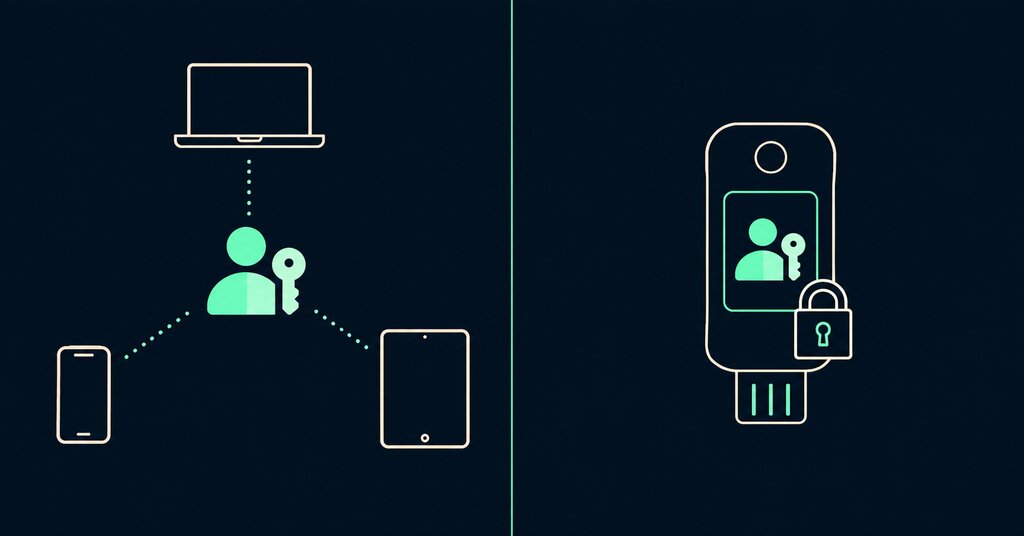
- A synced passkey can be made available on a user’s other devices through a credential manager. Depending on the provider, it may also be shareable.
- A device-bound passkey remains on a specific device or hardware security key and is not designed to be copied or shared.
The FIDO Alliance explains the distinction. Businesses should confirm which type a provider supports and how recovery, sharing and device changes are handled.
Why passkey support alone is not enough
Most password managers can now save and use passkeys. That only answers the first question: can an employee sign in?

A business also needs answers to the following:
- Is the passkey stored in a work-controlled vault or the employee’s personal credential manager?
- Can access be recovered if the original device is lost or replaced?
- Can authorised colleagues use the passkey when a legitimate shared account is involved?
- Can IT provision and remove employees through the existing identity system?
- What remains visible to administrators during security reviews and offboarding?
- Can the same platform continue to protect passwords for services that do not support passkeys?
Uniqkey was designed around this wider access-management problem. Passkeys are not treated as an isolated feature. They sit alongside passwords, secure sharing, Microsoft Entra integration, employee lifecycle management and company-controlled access.
Why businesses are prioritising passkey management now
Passkeys are moving from an optional convenience towards a preferred form of phishing-resistant authentication. At the same time, major business platforms are strengthening their authentication requirements.
Salesforce is a useful example. It enforces MFA for employee users and phishing-resistant MFA for privileged users. For affected direct logins, a privileged user can use a passkey or a physical security key. Salesforce has also made passkeys the default option during employee MFA registration.
This creates a practical problem for IT teams and MSPs. If a work passkey exists only on one administrator’s device, access can become dependent on that person and device. Recovery, continuity and offboarding become harder.
Uniqkey keeps work passkeys in the managed business vault. Where a shared operational account is allowed, authorised colleagues can share its passkey through Uniqkey instead of tying access to one employee’s personal credential store.
Shared credentials should only be used where the service agreement, licensing model and company policy permit them. Named privileged users should continue to use individual identities and their own authentication methods.
Read Prepare for Salesforce’s Mandatory MFA Changes for the requirements and rollout considerations.
How Uniqkey manages passkeys across the business
Uniqkey helps organisations introduce passkeys without abandoning the controls and workflows they already need for passwords and access.
Manage passkeys and passwords in one platform
Passkeys will not replace every business password at once. Employees will use both credential types for years, sometimes for different accounts within the same application environment.
With Uniqkey, employees can register and use passkeys for compatible services while continuing to use passwords where required. This avoids running a separate passkey product beside the organisation’s password manager.
Keep work credentials separate from personal credentials
A passkey created in a consumer credential manager can become tied to an employee’s personal ecosystem. That creates questions about ownership, recovery and access when the employee changes role or leaves.
Uniqkey separates work and private credentials and keeps business passkeys within the organisation’s managed environment.
Share passkeys for approved team access
Some business services still use shared operational accounts. Uniqkey allows a passkey to be shared with authorised colleagues when the account and company policy permit shared access.
This is particularly useful for MSPs and internal teams that need continuity across client portals, administration accounts or other shared services. Access can remain with the team instead of being tied to one person’s device.
Use Uniqkey-managed passkeys with Microsoft Entra
Uniqkey’s Microsoft integration goes beyond basic SSO.
Administrators can enable Microsoft’s Synced passkey profile so employees can use Uniqkey-managed passkeys with supported Microsoft Entra authentication flows. Uniqkey also supports:
- Microsoft Entra SSO for signing in to Uniqkey; and
- SCIM provisioning for synchronising users and groups.
See the practical guides for setting up Uniqkey passkeys with Microsoft Entra, configuring Entra SSO and provisioning users and groups with SCIM.
Microsoft account authentication and signing directly into a Windows device are different use cases. The Uniqkey guide covers synced passkeys for supported Microsoft Entra authentication flows.
Maintain European control
Uniqkey is European-owned and operates within European infrastructure. This gives European organisations a clearer option when provider jurisdiction, infrastructure location and digital sovereignty form part of procurement.
European ownership or hosting does not automatically create GDPR or NIS2 compliance. It is one part of a wider assessment covering technical, contractual and organisational controls.
Support deployment and employee lifecycle management
Passkey management is part of a broader access lifecycle. IT still needs to deploy the platform, provision employees, organise team access and remove access when responsibilities change.
Uniqkey combines passkeys with SCIM, enterprise deployment and wider password and access-management capabilities. This makes it suitable for organisations that want one managed transition rather than a standalone passkey feature.
See the product in practice: Explore how Uniqkey stores, uses and shares passkeys alongside passwords.
Frequently asked questions
Uniqkey is designed for European organisations that want passwords, passkeys and access management in one European-owned platform. It is particularly relevant when Microsoft Entra integration, controlled team sharing, employee lifecycle management and European infrastructure are important requirements.
Yes. Employees can register and use passkeys for compatible services through Uniqkey while continuing to manage passwords for services that still require them. Users can also add more than one passkey to a login.
Yes. Uniqkey supports passkey sharing for approved team access. The underlying service, licensing agreement and company access policy must also permit the shared account.
Yes. Uniqkey supports Microsoft’s synced passkey profile for supported Microsoft Entra authentication flows. It also supports Entra SSO and SCIM provisioning for synchronising users and groups.
Yes. Uniqkey can help MSP teams keep permitted client and operational credentials in a managed business vault instead of tying access to one technician’s personal device. Passwords and passkeys can be managed together, and authorised passkeys can be shared where the account permits shared access.
Salesforce requires phishing-resistant MFA for privileged users and accepts passkeys or security keys for affected direct logins. Uniqkey helps keep work passkeys in a managed business vault. For permitted shared Salesforce accounts, access can be made available to authorised team members without storing the passkey in one person’s personal credential manager.
No. Many services still require passwords, and some retain a password as a fallback even after a passkey is added. Businesses need a controlled way to manage both credential types during the transition.
No. European ownership and infrastructure can support sovereignty and procurement requirements, but compliance depends on the organisation’s complete technical, contractual and operational controls.
Why Uniqkey is the practical choice for the passkey transition
The best business passkey manager should do more than save a passkey. It should help the organisation control where work credentials live, introduce phishing-resistant sign-ins, maintain access to password-based applications and remove employee access cleanly.
Uniqkey brings those requirements together in one European password and access-management platform.
Choose Uniqkey when you need:
- passkeys and passwords managed side by side;
- company-controlled work credentials;
- passkey sharing for approved team accounts;
- Microsoft Entra synced passkeys, SSO and SCIM;
- wider onboarding, offboarding and access-management support; and
- a European-owned platform operating within European infrastructure.
See Uniqkey passkey management in action
Use a personalised demonstration to test Uniqkey against a real application, a shared-access scenario and an employee offboarding workflow. You can see how passkeys are created and used, how passwords remain available during the transition and how Uniqkey fits into Microsoft Entra and your wider access-management process.
Explore Uniqkey’s passkey capabilities
About this comparison: This article is published by Uniqkey. We naturally explain where we believe Uniqkey is the stronger fit, particularly for European organisations. Competitor information is based on publicly available documentation, and every provider should be tested against your own technical and operational requirements.