
Looking for a Shorter Overview?
AI Summary
Key Moments
Management Challenges of Salesforce MFA
MFA setup is easy but managing multiple credentials and backups across devices and users poses major operational hurdles.Uniqkey’s Passkey Solution for Admins
Uniqkey uses a browser extension to manage FIDO2 passkeys centrally, enabling multi-device access, backup, and SSO fallback.Automated 2FA Autofill for Employees
Uniqkey stores TOTP secrets and auto-fills 2FA codes to streamline login and reduce helpdesk calls during Wave 2 adoption.European Data Sovereignty Compliance
Uniqkey operates under Danish and EU law with infrastructure in Europe and zero-knowledge encryption to meet GDPR and NIS2 standards.Salesforce is enforcing phishing-resistant MFA for all privileged users and standard MFA for all remaining employees, both now scheduled for July 20, 2026. Admins who are not enrolled in a compliant method will be blocked at login.
We published a detailed technical guide covering exactly what is changing, who is affected, and how to configure Salesforce for compliance. This post focuses on a different question: once you understand the requirement, how do you actually roll it out across a team without creating a management headache, and without compromising on European data sovereignty?
Uniqkey handles both enforcement waves from a single platform. Here is how.


The Problem Is Not the Setup. It Is the Management.
Enabling phishing-resistant MFA in Salesforce takes ten minutes. An admin toggles two settings in Identity Verification under Setup, and the org is technically ready.
The harder part comes next.
Every admin needs to register their own passkey. They cannot share one. They need a backup method in case their primary device breaks. If they use multiple machines, each one needs to be covered. When someone leaves the team, their credentials need to be revoked. When someone joins, they need to be provisioned. If your organisation uses SSO and the identity provider does not pass the right authentication signal to Salesforce, admins need a Salesforce-native fallback method, which means another credential to manage.
Wave 2 lands on that same July 20 date, and every employee needs at least standard MFA. The technical bar is lower, any TOTP app qualifies, but the operational challenge is larger: getting hundreds of people to install an authenticator app, scan QR codes, and type six-digit codes at every login without flooding your helpdesk.
These are not Salesforce configuration problems. They are credential management problems. And they are exactly what Uniqkey is built to solve.
Wave 1: Passkeys for Privileged Users
Salesforce requires phishing-resistant MFA for anyone with the System Administrator profile, or the Modify All Data, View All Data, Customize Application, or Author Apex permissions. The compliant methods are built-in authenticators (Touch ID, Windows Hello), hardware security keys, and FIDO2-compatible passkeys in a credential manager.
How Uniqkey Handles This
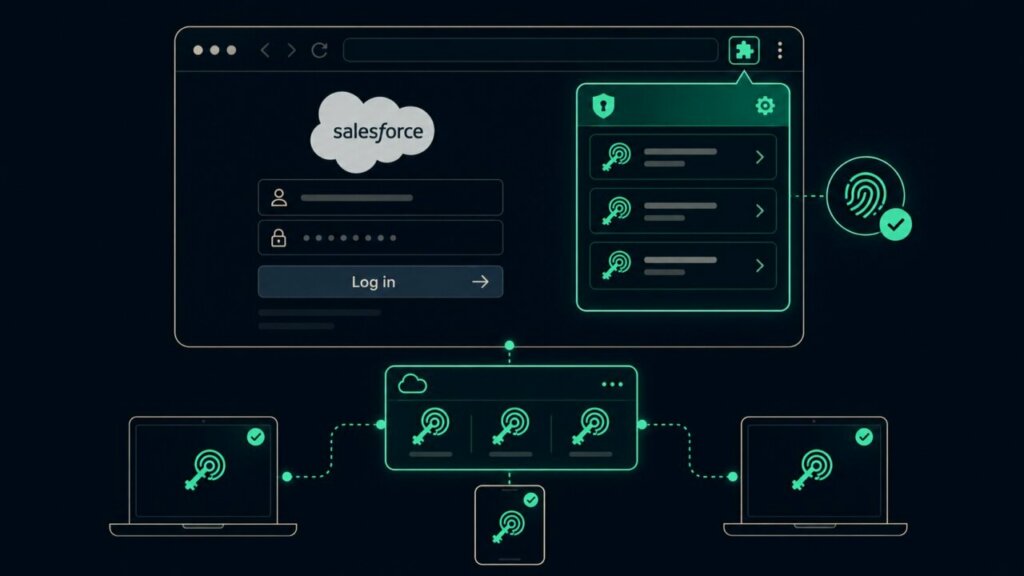
Uniqkey’s browser extension supports FIDO2/WebAuthn passkeys. When an admin registers a passkey for Salesforce, the extension intercepts the browser’s WebAuthn prompt and stores the passkey inside the Uniqkey vault.
As Salesforce specialists, we see many organisations working to strengthen authentication without slowing users down. Uniqkey helps address that balance by making 2FA easier for employees and more manageable for IT. For Salesforce customers preparing for the new MFA requirements, that can make adoption much simpler.”
–Thomas Henney,
CTO & Partner (Co-Founder), DYNACAP
From that point forward, Salesforce login works like this: the admin opens the login page, Uniqkey presents the passkey, the admin confirms with biometrics, and the session starts. No password to type. No push notification to approve. No six-digit code to copy.
What this solves at scale:
Multi-device access. The passkey syncs across every device where Uniqkey is installed. A new laptop is covered the moment the extension is set up. No re-registration in Salesforce required.
Backup without hardware keys. Salesforce recommends two registered methods per admin. With Uniqkey, the passkey travels with the vault, not the device. A broken laptop does not mean a locked-out admin.
SSO fallback. If your identity provider does not pass phishing-resistant signals to Salesforce (a common issue most teams discover too late), admins can use their Uniqkey passkey as the Salesforce-native second factor. No need to rush an IdP reconfiguration before the deadline.
Offboarding. When an admin leaves, IT revokes their Uniqkey access through the admin portal. Their passkeys, passwords, and shared credentials are removed in one step. No need to track down individual Salesforce registrations across devices.
Wave 2: 2FA for Every Employee
From July 20, every Salesforce employee user needs at least standard MFA. Authenticator apps, push notifications, and hardware keys all qualify. The technical requirement is straightforward.
The adoption challenge is not.
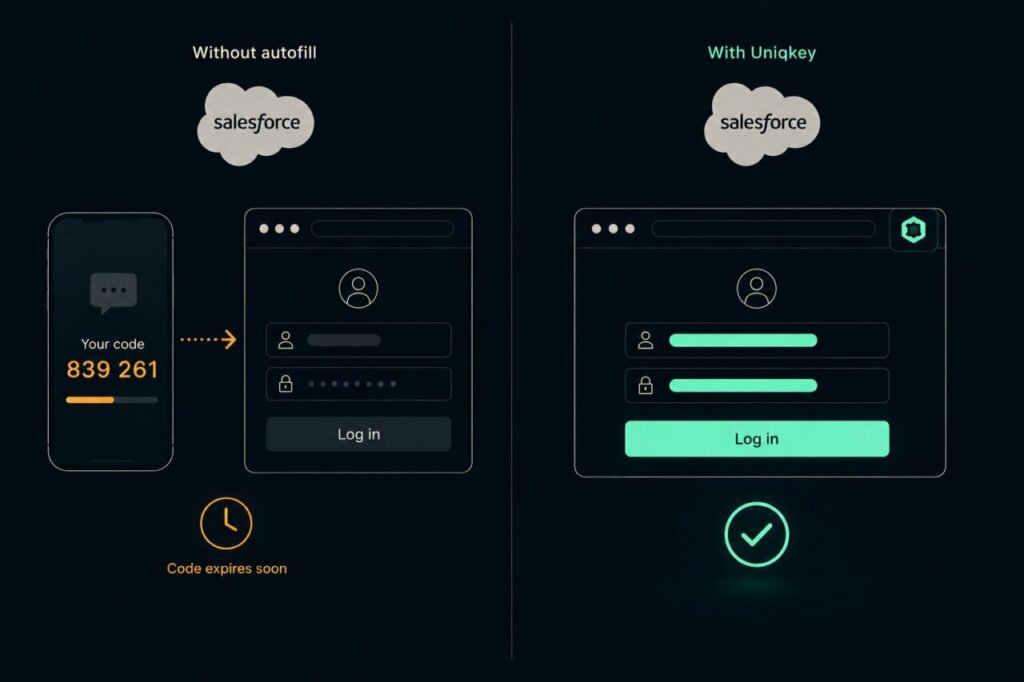
Ask 500 employees to install Google Authenticator, scan a QR code per service, and type a six-digit code every time they log in. Some will do it. Some will call IT. Some will find workarounds. The code expires in 30 seconds. The app is on a different device. The phone is in another room. Every small friction point erodes adoption.
How Uniqkey Handles This
Uniqkey’s 2FA autofill stores TOTP secrets inside the vault and fills the six-digit code automatically at login, the same way it fills passwords. The employee clicks the login page, Uniqkey fills the credentials and the 2FA code, and the session starts. No app switching. No manual entry. No expired codes.
From the employee’s perspective, MFA becomes invisible. From IT’s perspective, it is centrally managed, auditable, and requires no per-user support.
How Caljan Did It
Caljan, a logistics automation company with 750 employees, deployed Uniqkey specifically to solve the 2FA adoption problem. Their IT Manager, Kent Kirkegaard, chose Uniqkey because it made 2FA easy enough that employees used it without resistance. No training sessions. No support backlog. The rollout happened and the helpdesk stayed quiet.
That is the difference between mandating MFA and actually achieving adoption.
One Platform, Both Waves
Most approaches to the Salesforce MFA enforcement treat Wave 1 and Wave 2 as separate problems requiring separate tools. Passkeys for admins, a TOTP app for everyone else. Two systems. Two support surfaces. Two sets of credentials to manage.
Uniqkey covers both from a single platform:
| Wave 1 (Admins) | Wave 2 (All Users) | |
|---|---|---|
| Requirement | Phishing-resistant MFA | Standard MFA |
| Uniqkey method | FIDO2 passkeys via browser extension | 2FA autofill (TOTP) |
| User experience | Biometric confirmation, no password | Automatic code fill, no app switching |
| IT management | Central passkey governance via admin portal | Central TOTP governance via admin portal |
| Offboarding | Revoke access, passkeys removed | Revoke access, TOTP secrets removed |
Both methods are managed through the same admin portal, covered by the same audit log, and governed by the same group management and onboarding/offboarding controls. One deployment. One vendor. One compliance surface.
Why This Matters Beyond Salesforce
Salesforce is not the only platform heading in this direction.
Microsoft enforced phishing-resistant MFA for Azure admin accounts through 2024 and 2025. NIS2 implementation guidance across EU member states increasingly requires phishing-resistant authentication for privileged access. DORA applies the same standard to financial services. Cyber insurers are updating their questionnaires to ask specifically about authentication methods for high-privilege accounts.
Treating the Salesforce deadline as an isolated compliance task means repeating the same work, choosing a tool, deploying it, managing credentials, for every platform that follows. Building the infrastructure once, with passkeys and 2FA managed centrally, means every future requirement is already met.
Every service your team uses that supports FIDO2 passkeys is covered the moment the passkey is registered in Uniqkey. Every service that uses TOTP codes is covered the moment the secret is stored in the vault. The Salesforce enforcement is the forcing function, but the value extends to every login your organisation manages.
The European Infrastructure Question
For European organisations, the tool you choose for credential management carries compliance weight beyond the Salesforce requirement.
Authentication telemetry, which accounts are enrolled, when and where they authenticate, from which devices, is sensitive operational data. Under GDPR, it is personal data. Under NIS2, it falls within the scope of technical access control measures that must be appropriate and auditable.
If the platform managing this data is headquartered outside the EU, it may be subject to foreign legal access. The US CLOUD Act compels US-headquartered companies to produce data held anywhere in the world, including on EU-hosted infrastructure. An “EU data centre” operated by a US parent company does not provide the same legal protection as a platform owned and operated under EU law.
Uniqkey is built specifically for this context:
- Danish-owned and operated under Danish and EU law
- ISO 27001 certified
- Infrastructure exclusively within Europe
- Zero-knowledge encryption: Uniqkey cannot access vault contents
- No exposure to CLOUD Act, FISA Section 702, or Executive Order 12333
Meeting the Salesforce MFA requirement with a European tool addresses the platform compliance deadline and the broader regulatory expectation in one decision.
Getting Started
Deploying Uniqkey for Salesforce MFA compliance follows a straightforward sequence:
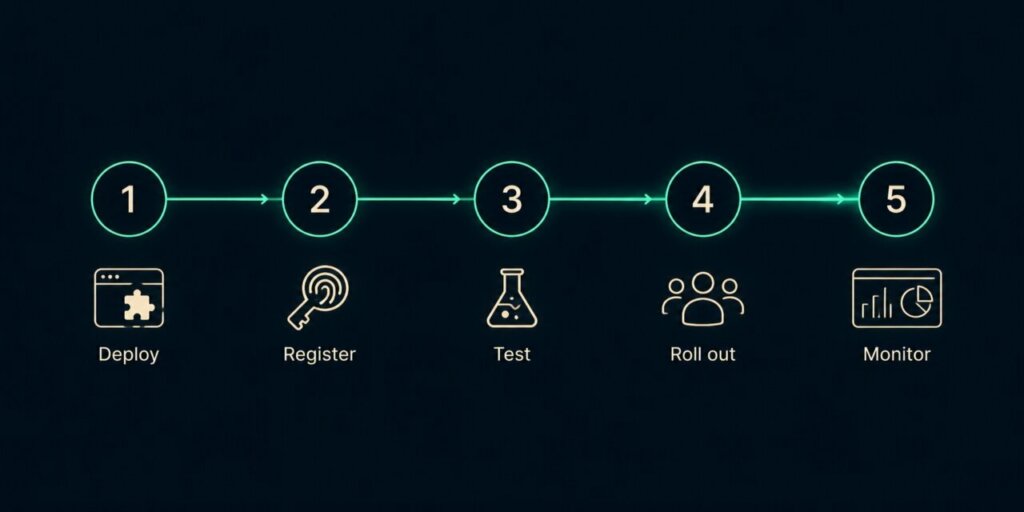
1. Deploy Uniqkey to admin users first. Install the browser extension and invite admins to create their Uniqkey account. This can be done in bulk through the admin portal or via directory sync.
2. Register Salesforce passkeys. Each admin visits their Salesforce settings, adds a built-in authenticator, and the Uniqkey extension captures the passkey. The process takes under two minutes per user.
3. Test in Salesforce sandbox. Have admins log out and back into the sandbox environment. Verify the passkey challenge appears and completes successfully. Verify the experience across devices.
4. Roll out to all employees for Wave 2. Deploy the browser extension company-wide. Employees store their Salesforce password and TOTP secret in Uniqkey. From that point, login is fully automated: credentials and 2FA code filled in one step.
5. Monitor from the admin portal. Track enrolment, authentication events, and compliance status from the Uniqkey dashboard. Identify any users who have not completed setup before the enforcement date.
The full deployment can be completed in days, not weeks. For a detailed walkthrough of the Salesforce configuration steps (enabling methods in Setup, handling SSO signals, auditing integration users), see our complete technical guide.
Frequently Asked Questions
Yes. Uniqkey stores passkeys using the FIDO2/WebAuthn standard. Salesforce confirmed in June 2026 that cloud-synced credential managers using WebAuthn qualify as phishing-resistant MFA.
Yes. Admins use FIDO2 passkeys via the browser extension. All other users use 2FA autofill, which stores TOTP secrets and fills six-digit codes automatically at login. Both are managed from the same admin portal.
Most teams deploy to their admin group in a single day. Company-wide rollout for Wave 2 typically takes 3-5 days depending on team size and whether directory sync is used.
Uniqkey can be deployed alongside existing tools during a transition, or as the primary credential manager. The passkey and 2FA autofill capabilities are available regardless of whether the team uses Uniqkey for password storage.
Yes. If your identity provider passes phishing-resistant signals to Salesforce, Uniqkey manages the credentials used to authenticate at the IdP. If your IdP does not pass the right signals, Uniqkey passkeys serve as the Salesforce-native fallback, so admins are compliant regardless of the IdP configuration.
Yes. Uniqkey offers a free trial, so you can experience the whole platform for you and your team. Start here →
Salesforce MFA enforcement starts July 20, 2026 for both admins and all users (the original July 1 admin deadline was pushed back to align with Wave 2). The requirement is not optional, and sandbox enforcement is already live as of July 6, 2026.
Uniqkey gives your team passkeys for Wave 1, 2FA autofill for Wave 2, and central governance for everything that comes after, all from European infrastructure under EU law.